
Once your first order is complete, you do not need to start from the beginning each time you need more medication.
We already have the information from your previous order in our system. For most refills, the process is much simpler than placing your first order.
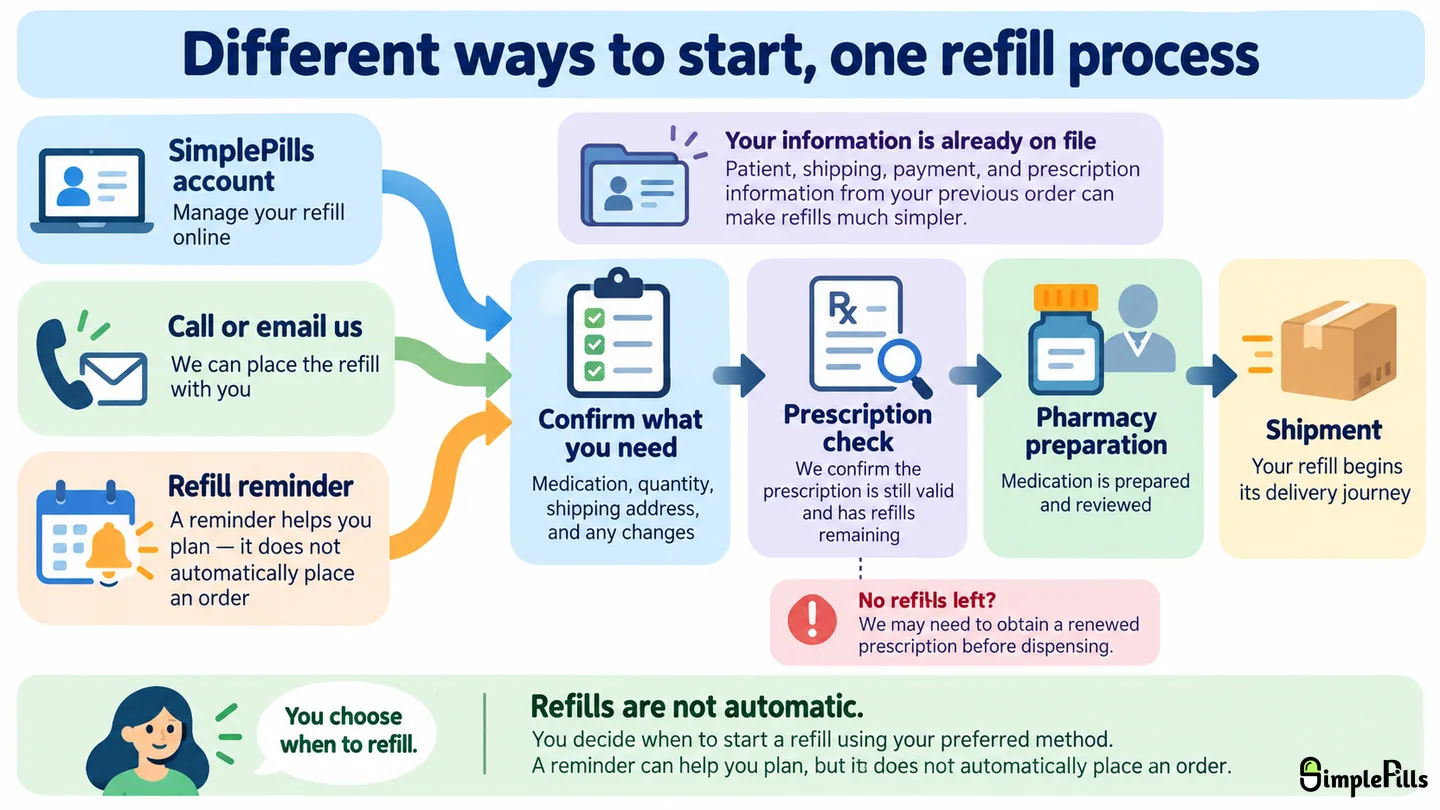
If you already have a SimplePills account
If you placed your original order through your SimplePills account, your information should already be available there.
You can sign in and use your account to manage your next refill. For most patients, placing a refill should only take a few clicks.
Because the rest of your information is already on file, the refill process is usually much quicker than placing your first order.
If your first order was placed over the phone
If we placed your original order with you over the phone, that order may have been entered directly into our internal pharmacy system rather than through an online account.
You can still create a SimplePills account at any time.
When you first create the account, you may not immediately see the information from your earlier order. Once the account is created, we can move your existing information into your account so you can begin managing your own refills online.
You do not have to switch to online ordering if you do not want to. If you prefer, you can continue placing refills with us by phone or email.
What happens after you place the refill?
If everything is ready, the order can move into the pharmacy workflow for preparation and pharmacist review. Because your information is already on file, this can often move very quickly.
If your prescription has expired or has no refills remaining, we may need to obtain a renewed prescription before we can dispense the refill. We explain that process in What happens when your prescription has no refills left?.
What if something about the medication has changed?
If your prescriber changed the strength, directions, dosage form, or another part of the prescription, let us know before the refill is prepared.
If you want to switch between brand and generic, request a different generic manufacturer, or make another product preference change, let us know before you place the refill so we can update the order appropriately.
You can usually change the quantity yourself when the quantity you want is available as an option and your prescription allows it. If you need a quantity that is not shown on our website, let us know before placing the refill and we can help update it for you.
Some changes are simply order or product preferences. Others may require an updated prescription or pharmacist review before we can proceed.
We cover those situations in What if your medication changes before your next refill?.
What about refill reminders?
We may send you a refill reminder based on the estimated amount of medication you have left.
A reminder is simply a prompt to start thinking about your next order. It does not automatically create, charge, dispense, or ship a refill.
You still decide when you want the next refill and confirm that you want us to proceed.
If you are not sure when to reorder, see When should you order your next refill?.
You can always ask us to place the refill with you
If you would rather not manage the refill through your online account, that is completely fine.
You can call or email us and we can help place the refill with you using the information already saved in our system.
See our Contact Us (opens in a new tab) page for ways to reach us.
Where to go from here
Most refills are straightforward when the prescription is still valid and nothing has changed.
If your prescription is expired or has no refills remaining, the next article explains what happens next.
Continue to What happens when your prescription has no refills left?.